
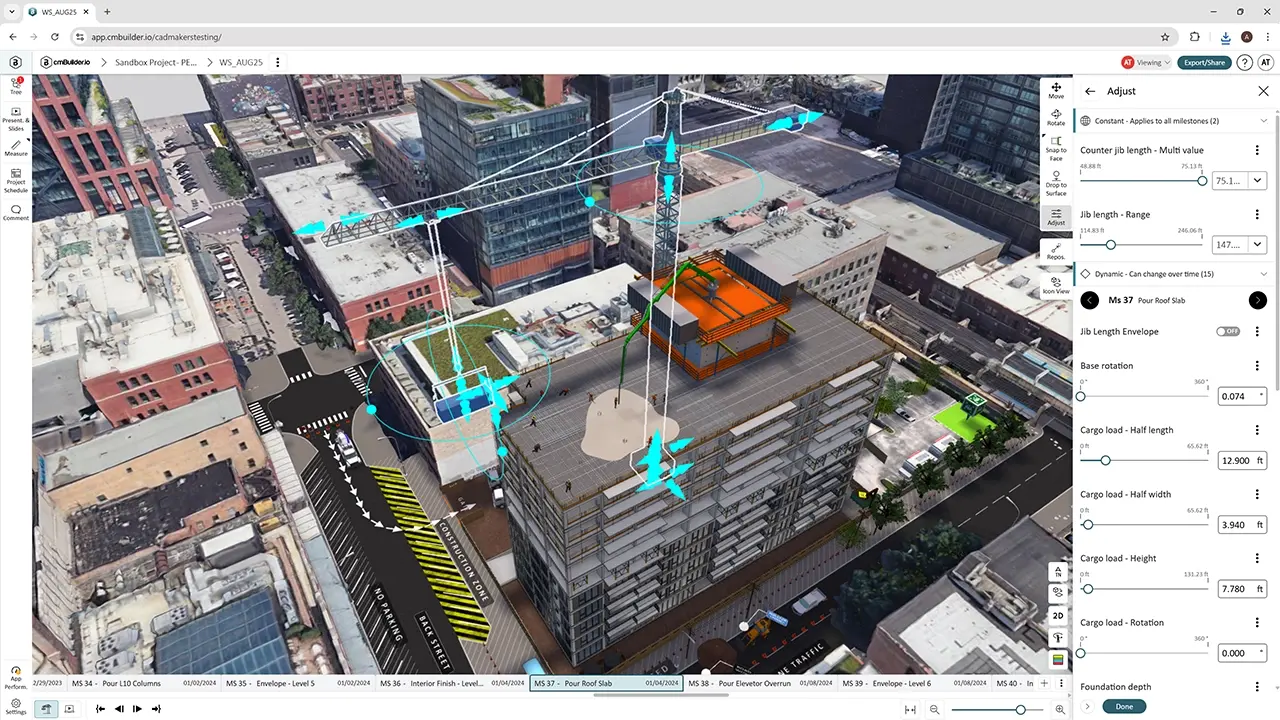
Plan your site in 2D, 3D and 4D, before you mobilize. cmBuilder auto-generates your construction site in context, lets you drag and drop cranes, fencing, trailers and staging onto it, and links every phase to your schedule so the whole team can see how the job will actually get built.
14-day free trial. Trusted by hundreds of construction teams, including PCL Construction, Robins & Morton, John Holland and RC Andersen. Unlimited users on every plan.
Every project has a logistics plan. The trouble is where it lives. Most planning still happens in schedules, 2D drawings and fragmented conversations, and those tools don't show how the jobsite actually functions from one phase to the next.
That gap shows up on site as:
Without good logistics planning, sites become disorganized, workers and the public are exposed to more hazards, and work takes longer, which hits the schedule and the margins. The issue isn't a lack of planning. It's that the plan isn't visible, testable or shared in a way teams can align around.
Enter an address and cmBuilder generates a 3D topographic map of your site, in context. For accurate existing conditions, load 3D drone scan or survey data.
Import 3D BIM models (IFC 2x3 and 4, Revit RVT, STEP and FBX), upload 2D drawings as reference (PDF, JPEG, PNG), and import your schedule from Primavera P6, Microsoft Project, Asta Powerproject or CSV. No BIM model yet? Use the built-in massing tool to model the core, slabs, podiums and excavation on top of your 2D layout in minutes, with no prior 3D modeling experience.
Pick from a library of 4000+ construction resources, including cranes, hoists, trailers, trucks, fencing, hoarding, formwork, concrete pumps, scaffolding and manlifts, and drop them onto the site. Plan crane access, positioning and swing radius, define laydown zones, and map truck access, routing and pump placement. If you need a resource that isn't in the library, the cmBuilder team can create it for you.
Map site access, truck routing, deliveries and roadway closures, and plan pedestrian diversions so owners, councils and the public understand how the works affect access and traffic.
Use excavation modeling with simple workflows, then link massings, equipment and resources to schedule activities. Watch staging areas change, buildings rise, and cranes get installed and removed across every phase of the project.
cmBuilder automatically quantifies elements through the phases of your project, so items like trailer months and linear feet of fencing by phase come straight from the plan.
Work on the same plan in real time with multiplayer mode, build presentations, and share live links. Anyone with the link can view and interact with the simulation, without needing a login. cmBuilder runs 100% in the browser, with nothing to install.

Win more bids with clear execution plans owners understand, and coordinate trades, logistics and sequencing before construction starts. Present site logistics across all phases, equipment, access and staging strategies, and constraint-aware construction approaches, so preconstruction models the approach, operations validates it, and subs understand the constraints.
Plan pours, crane picks and temp works before pour day. Visualize pour sequencing by phase, plan truck access, routing and pump placement, and show GCs exactly how your work gets executed.
Plan lift sequencing, crane access and steel staging before mobilization. Define crane positioning, swing radius and laydown zones so conflicts are found before steel hits the site.
From demolition and earthworks to prefab and facade, plan sequencing, access and logistics before you mobilize. VDC and preconstruction teams build the plan; superintendents and field teams use it on site.
“We saved $30 to $40 million and three months of schedule on a single project because we could validate a major change in less than a week.”
— Aaron Akehurst, Manager, Construction Services, PCL Construction
“The last six project pursuits where I used cmBuilder, we've won. I've never been on a run like that before.”
— Mike Ruizzo, Manager of BIM and VDC, Robins & Morton
“When everyone involved already has foreknowledge of what could happen on site, it gives you the advantage from the beginning.”
— Brian Dover, BIM & Digital Coordinator, RC Andersen
“When people can see the environment in 3D and understand it spatially, the message is clear without needing extensive explanation.”
— Warren Allan, Digital Engineering Manager, John Holland
Used by teams at PCL · Robins & Morton · John Holland · RC Andersen · Gilbane · Hensel Phelps · McCarthy · Skanska · Clayco · Graham · EllisDon · JE Dunn · Naylor Love · BZI
It's software for planning how people, equipment and materials move in and around a construction site. In cmBuilder, you generate the site in context, place temporary resources like cranes, hoists, fencing and staging, link them to your schedule, and share the plan as a live 3D/4D model.
Site access and exits, haul roads and traffic flow, worker parking, staging and storage areas, locations for tower cranes, material hoists and loading zones, and safety measures such as muster points and emergency vehicle routes. For a full walkthrough, read our guide to effective site logistics planning.
Enter your project address to generate the site, import your BIM model or 2D drawings (or use the massing tool), drag and drop resources from the library, then import your schedule and link activities to build the 4D sequence. Share it with a live link when it's ready.
No. You can start from 2D drawings and use the built-in massing tool to create 3D buildings and site elements, then link them to your schedule for a full 4D simulation.
Schedules from Primavera P6, Microsoft Project, Asta Powerproject or CSV; 3D models in IFC (2x3 and 4), Revit (RVT), STEP and FBX; and 2D drawings in PDF, JPEG and PNG.
Yes. Anyone with a shared link can view and interact with your live simulation, with no login required. Every plan also includes unlimited users.
Book a customized demo and see how your team can plan cranes, access, staging and phasing in 3D and 4D, then share one live plan with everyone on the project.